

Download TiVo Desktop – Free Video Management & TV Tuner Software for Windows
TiVo Desktop is a powerful, free video management tool designed specifically for Windows users who want to organize, record, and play back their favorite TV shows. Developed by TiVo, this software is part of the Video software category, with a focus on TV Tuners & Video Capture. Although its last major update was in 2007, TiVo Desktop remains a reliable solution for users looking to manage recorded content from their TiVo devices.
With a lightweight footprint and intuitive interface, it’s ideal for those who want a straightforward way to access and manage their digital video library. The software supports older Windows versions, including Windows 2000, making it accessible to a wide range of users. Despite its age, TiVo Desktop continues to be popular in countries like the United States, United Kingdom, and the United Arab Emirates, with over 11,900 downloads since being added to our software catalog in 2007.
Key Features of TiVo Desktop
TiVo Desktop offers a suite of features that make managing recorded TV content a breeze. One of its standout capabilities is seamless integration with TiVo DVR devices. Once connected to your TiVo box via your home network, the software allows you to browse, search, and play back recorded shows directly from your computer. This is especially useful for users who want to watch their favorite programs on a larger screen or in a different room than the TV.
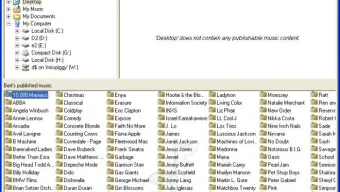
Another major feature is its robust video library organization. TiVo Desktop automatically categorizes your recordings by title, date, genre, and episode number, making it easy to find specific content. You can also create custom playlists and mark shows as favorites for quick access. The software supports various video formats, ensuring compatibility with most recordings from your TiVo device.
For users who want to back up their content, TiVo Desktop includes a simple export function that allows you to copy recordings to your local hard drive. This is ideal for preserving content that might otherwise be lost if the TiVo device fails or is replaced. Additionally, the software supports metadata retrieval, meaning it can automatically download episode descriptions, cast information, and even cover art to enhance your viewing experience.
Despite being over a decade old, TiVo Desktop remains functional and stable on older Windows systems. Its lightweight design ensures it runs smoothly even on machines with limited resources. While it lacks modern features like cloud sync or mobile access, its core functionality is still highly relevant for users with legacy TiVo setups. For those who value simplicity, reliability, and a no-frills approach to video management, TiVo Desktop is an excellent choice.
Installation & Usage Guide for Windows Users
Installing TiVo Desktop is a straightforward process, especially for users familiar with older Windows operating systems. First, ensure your computer is running a compatible version of Windows—this includes Windows 2000, XP, or earlier versions. While newer systems like Windows 10 or 11 may not officially support the software, some users have reported success using compatibility mode.
To begin, download the TiVo Desktop installer from a trusted source. Once downloaded, double-click the file to launch the setup wizard. Follow the on-screen prompts, choosing your preferred installation directory. The process is quick and requires minimal user input. After installation, launch the application from the Start menu or desktop shortcut.
Upon first launch, TiVo Desktop will prompt you to connect to your TiVo DVR. Ensure both your computer and TiVo device are on the same local network. The software will automatically detect your TiVo box, but if it doesn’t, you can manually enter the device’s IP address. Once connected, the interface will load your recorded shows, movies, and other media.
From here, you can browse your library, play videos, create playlists, and export content. The interface is clean and user-friendly, with intuitive navigation. Right-clicking on a show gives you options to play, delete, or add to a playlist. For advanced users, the software also allows you to schedule recordings remotely through your TiVo account.
It’s important to note that since TiVo Desktop hasn’t been updated since 2007, some features may not work as expected on modern networks or with newer TiVo models. However, for users with older TiVo devices and stable home networks, it remains a reliable tool for managing recorded content.
Compatibility & System Requirements
TiVo Desktop is specifically designed for Windows-based systems and is not available for Mac, Android, or iOS platforms. It supports older operating systems such as Windows 2000, Windows XP, and earlier versions. This makes it a niche but valuable tool for users with legacy hardware or those who still rely on older TiVo DVRs.
The software has minimal system requirements, which is one of its biggest advantages. It runs efficiently on machines with limited RAM and processing power. A typical installation takes up less than 100 MB of disk space, making it an excellent choice for users with older computers or limited storage capacity.
Network compatibility is crucial for TiVo Desktop to function properly. The software requires a stable local network connection between your computer and your TiVo DVR. Both devices should be connected to the same router or network segment. While Wi-Fi works, a wired Ethernet connection is recommended for the most reliable performance.
It’s worth noting that modern security updates and network configurations may interfere with TiVo Desktop’s ability to detect or communicate with your TiVo device. If you encounter connection issues, try disabling firewalls temporarily or adjusting your router’s settings to allow local device discovery. Some users have also found success using compatibility mode in Windows to run the software on newer systems.
While the lack of support for modern operating systems is a limitation, TiVo Desktop’s compatibility with older Windows versions ensures it remains a viable option for a dedicated user base. For those with older TiVo setups, it’s still one of the most effective ways to manage recorded content from their DVR.
Pros & Cons: Is TiVo Desktop Right for You?
- Pros:
- Free to download and use with no hidden costs
- Lightweight and fast, ideal for older computers
- Seamless integration with TiVo DVR devices
- Organizes recordings with metadata, playlists, and search
- Supports video export for backup purposes
- Stable and reliable on compatible systems
- Cons:
- No support for Windows 10, 11, or modern OS versions
- Outdated interface with no recent updates
- Lacks cloud sync, mobile access, or streaming features
- Not compatible with Mac, Android, or iOS
- May face connectivity issues on modern networks
Frequently Asked Questions (FAQ)
Is TiVo Desktop free to download?
Yes, TiVo Desktop is completely free to download and use. There are no subscription fees or hidden charges. It’s a great option for users who want a no-cost solution for managing their TiVo recordings.
Can I use TiVo Desktop on Windows 10 or 11?
While TiVo Desktop was not officially designed for Windows 10 or 11, some users have managed to run it successfully using compatibility mode. However, performance and connectivity may vary, and it’s not guaranteed to work on all systems.
Does TiVo Desktop support Mac or mobile devices?
No, TiVo Desktop is only available for Windows operating systems. It does not support Mac, Android, or iOS devices. Users on other platforms should consider alternative TiVo apps or web-based solutions.
How do I connect TiVo Desktop to my TiVo DVR?
Ensure both your computer and TiVo device are on the same local network. Launch TiVo Desktop, and it will automatically detect your DVR. If not, manually enter the TiVo’s IP address in the connection settings.
Can I export recorded shows from TiVo Desktop?
Yes, TiVo Desktop allows you to export recorded videos to your local hard drive. This is useful for creating backups or transferring content to other devices. The exported files are typically in standard video formats like MPEG-2.
Conclusion: A Reliable Legacy Tool for TiVo Users
TiVo Desktop remains a solid choice for Windows users with older TiVo DVRs who need a reliable, free tool to manage their recorded content. Despite its age and lack of modern updates, it delivers core functionality with minimal overhead. Its lightweight design, seamless integration with TiVo devices, and support for video export make it a valuable asset for preserving and organizing your favorite shows.
While it may not offer the advanced features of today’s streaming apps or cloud-based platforms, TiVo Desktop excels in simplicity and stability. If you’re still using a legacy TiVo system and want a no-cost way to access your recordings on your PC, this software is definitely worth downloading.
Download TiVo Desktop today and take full control of your video library—free, secure, and easy to use on compatible Windows systems.







